🔥
ExclusiveAn exclusive new experience — React Native support is on its way to Planby!
Your event schedule in Framerin 10 minutes, not 2 days.
A ready-made schedule & timeline component for Framer — no grids built by hand.
⚡
Paste a URL, drag it in
No plugins, no code component, no account
🎨
Matches your brand in one click
18 presets, then override any color
🔄
Your agenda from the Framer CMS
Sync a CMS collection with the CMS Sync plugin
One-time payment
Commercial license
Lifetime updates
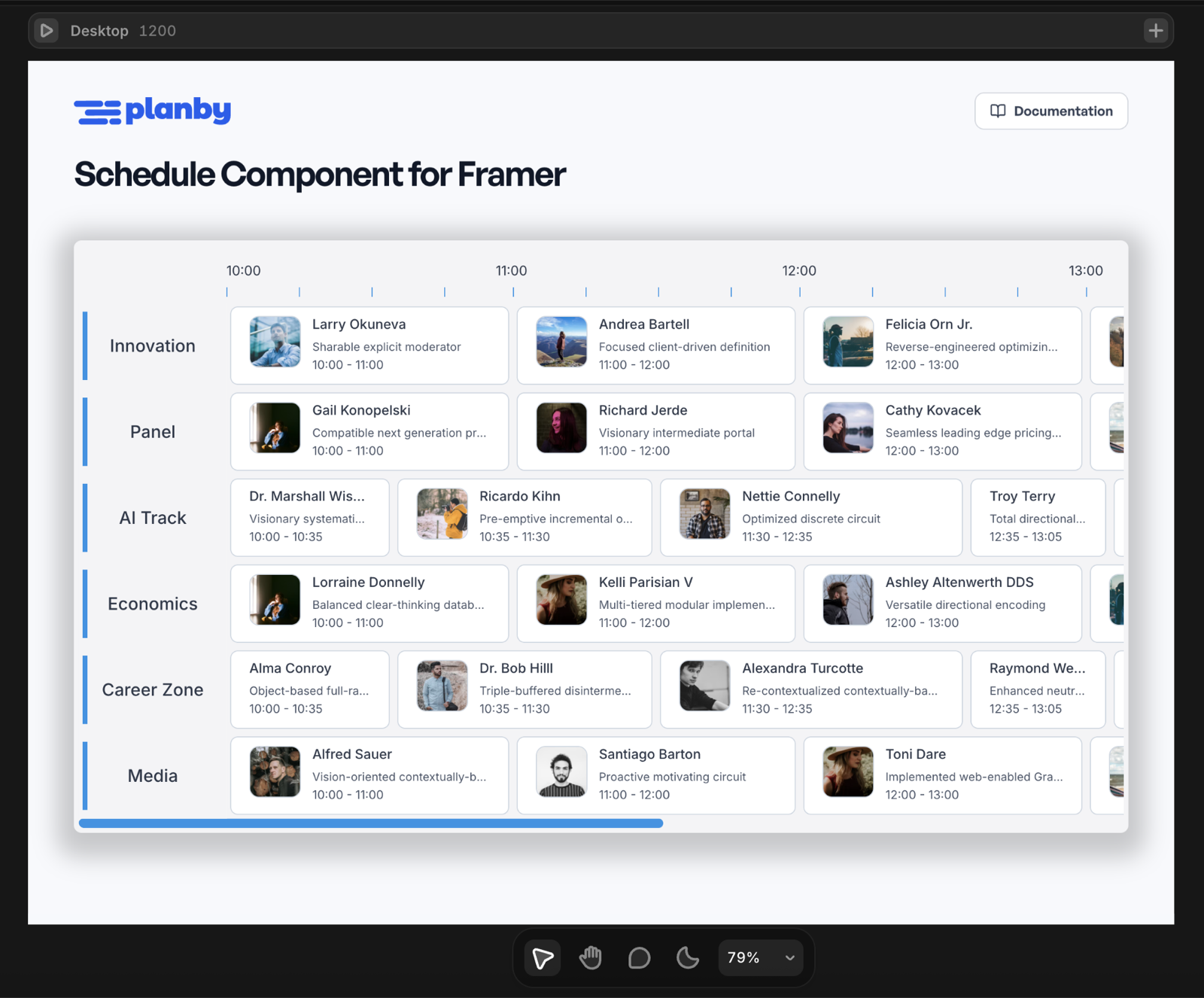
A schedule is not a layout. It is a component.
Framer is great at layout — and a timetable is not one. Events have to sit where their start and end time says they sit, and that is where hand-built agendas fall apart.
😩
Building it by hand
A day or two of fiddly work — every time.
Hand-built grids break
Stacks and frames placed by eye look fine until an event moves 15 minutes — then the whole row is misaligned again.
Every edit is manual
A speaker cancels and you reposition tiles one by one. The day before the event, that is the last thing you want to do.
No time axis, no scroll
A real schedule needs hours across the top, a current-time line, and horizontal scrolling on mobile. That is a build, not a layout.
Details need a modal
Abstract, speaker photo, social links — clients always ask for them. Now you are wiring overlays and variants.
Total
12 – 24 hours
🚀
With Planby Schedule
One component. Configured, not constructed.
A real timeline, instantly
Channels as rows, events positioned by their actual start and end time. Change a time, the tile moves itself.
Edit in the property panel
Add, rename, and retime events without touching the canvas. Or sync the whole agenda straight from your Framer CMS.
Scrolling and live line built in
The component handles its own horizontal and vertical scrolling, and marks the current time automatically.
Event modal included
Click an event and the details modal opens with image, description, and up to five social links. Already built.
Total
~10 minutes
VS
A real Framer site, running the component
Change the accent color and watch the whole agenda follow. Try the zoom, row height, and image style controls — the same ones you get in the property panel.
Three steps. Zero code.
No npm, no build step, no code component in Framer. You paste a URL and fill in a panel.
Buy and activate
One-time $29 purchase. Activate the license key in the Planby Portal and copy your personal Component URL.
Paste the URL into Framer
Paste it on the canvas or into the Assets panel. Planby Schedule appears in your Assets, ready to drag onto a page.
Add your schedule and style it
Sync your Framer CMS collection, or type channels and events in by hand. Pick a theme, set your brand color, adjust zoom and row height. Publish.
▶
Watch the full setup
Install, add your schedule, and style it — start to finish
Your CMS, straight into the schedule
Keep the agenda where your content already lives. The Planby Schedule — CMS Sync plugin connects your Framer CMS collections to the component, so editing an event is editing a CMS entry — not touching the design.
Framer CMS
Your events live in a CMS collection — titles, times, images, descriptions.
↓
Sync
The plugin maps your collection fields onto channels and events.
↓
Beautiful schedule
The component renders it — themed, responsive, with the event modal.
Why sync instead of import?
Editors never open the designer
Your client updates a CMS entry. The schedule follows. No Framer seat, no design file, no risk.
One source of truth
The same collection can power the schedule, a speakers page, and a search — no duplicated agenda.
No re-importing after every change
A CSV is a snapshot. A CMS collection is live — change an entry and you are done.
🔌
Planby Schedule — CMS Sync
Available now on the Framer Marketplace. Install it into your project like any other Framer plugin.
Get the plugin on Framer →Watch the CMS setup in the tutorial →Anyone publishing a day full of events
If your page has tracks, stages, rooms, or channels running in parallel — this is the component you were about to build yourself.
Framer designers & freelancers
You ship client sites in Framer and one of them needs an agenda. Drop the component in, style it to the brand, move on to the next section.
→
One section done before your coffee goes cold
Agencies & studios
Stop quoting days for a custom schedule build. One $29 component covers every conference, festival, and event site you deliver.
→
Buy once, bill it on every project
Conference & meetup organizers
Publish the agenda yourself. Tracks as rows, talks as events, speaker photos on the tiles — no developer in the loop.
→
Change the lineup without asking anyone
Festival & music promoters
Stages as rows, sets as events. The Music image style renders circular artist avatars, which is exactly what a lineup page needs.
→
A lineup page that looks like a poster
TV, streaming & radio
The classic program guide layout — channels down the side, programs across the hours, current-time line included.
→
A real EPG, not a styled table
Sports clubs & venues
Pitches, courts, or disciplines as rows. Match times and results laid out on one readable day view.
→
The whole matchday on one screen
Roughly two days of work for $29
Here is what a custom-built schedule actually costs you in Framer, versus what the component already does.
12 – 24 h
Hand-built from scratch
Per project, every project
~10 min
With Planby Schedule
Purchase to published page
$29
One-time cost
No subscription, reusable
| What it takes | Built by hand in Framer | Planby Schedule |
|---|---|---|
| Build the time axis and grid | 3 – 5 h | ✓ Built in |
| Position every event by time | 2 – 4 h | ✓ Automatic |
| Event details modal | 2 – 3 h | ✓ Built in |
| Horizontal + vertical scrolling | 1 – 2 h | ✓ Built in |
| Current-time (live) line | 1 – 2 h | ✓ One toggle |
| Responsive behaviour | 2 – 4 h | ✓ Built in |
| Restyling for a new client | 2 – 4 h | ✓ Pick a preset |
| Changing the agenda later | 30 – 60 min | ✓ Edit a field |
Estimates based on building an equivalent multi-track schedule manually in Framer.
Everything a schedule needs, already built
Sidebar, timeline, layout, and event details modal ship in one component.
🗓️
Interactive schedule & timeline
Channels as rows, events across a horizontal time axis. Hover states, a live line, and an event details modal are built in — nothing to wire up.
🎨
Fully customizable
18 theme presets plus semantic color overrides. Hour width, row height, sidebar width, corner radius, shadow, time format — all from the property panel.
📱
Responsive
The component handles its own scrolling when the schedule is wider or taller than the frame, so it behaves on desktop, tablet, and mobile breakpoints.
📄
Commercial license
Use it in client work and commercial projects. One-time purchase, no subscription, no per-site fee.
♾️
Lifetime updates
Your Component URL always points to the latest version. New releases arrive through the Planby Portal automatically.
📚
Documentation included
Full docs covering installation, schedule data, CSV import, themes, layout, the event modal, publishing, and troubleshooting.
18 themes, or your exact brand colors
Start from a preset, then override the semantic colors. Every control lives in the Framer property panel.
🎨 Theme presets
Default, light variants (purple, black, teal, pink), dark variants (teal, magenta, red, pink, yellow), plus purpose-built templates in light and dark:
🖌️ Semantic color overrides
- Accent & background
- Event background & event border
- Text & muted text
- Scrollbar
- Live highlight
Hover text colors are calculated automatically so they stay readable against whichever highlight color you pick.
Layout & appearance controls
| Control | Range | Default | What it does |
|---|---|---|---|
| Hour width | 100 – 500 px | 300 px | Zoom level — width of one hour on the timeline |
| Sidebar width | 0 – 300 px | 200 px | Width of the channel-name column |
| Row height | 40 – 200 px | 90 px | Height of each channel row |
| Corner radius | — | 8 px | Outer radius of the schedule |
| Event images | on / off | on | Show images on event tiles |
| Image style | Conference / Music | Conference | Rounded rectangle or circular avatar with gradient |
| Short descriptions | on / off | on | Show a short description on the tile |
| Live line | on / off | on | Current-time indicator |
| Time format | 12h / 24h | 24h | Timeline hour labels |
One Payment. Yours For Good
No subscription, no per-site fee. Buy once, use it in commercial projects forever — with lifetime updates included.
Framer
🎨$
29
one-time
- Interactive schedule & timeline
- 18 theme presets + color overrides
- Framer CMS sync, manual entry & CSV
- Event details modal
- Responsive with built-in scrolling
- Commercial license
- Lifetime updates
- Documentation included
Questions, answered
What is Planby for Framer?
Planby for Framer is a no-code schedule and timeline component for Framer. You drop it into a Framer project and configure it entirely from the property panel — channels, events, images, descriptions, social links, themes, and an event details modal. It is built for conference schedules, festival lineups, sports timelines, and TV guides.
Do I need to know how to code?
No. Everything is configured through Framer's Properties panel. There is no code component to write, no API keys, and no Planby account needed to run the component on your site.
How long does it take to set up?
Around ten minutes from purchase to a published schedule. Activating the license and copying the Component URL takes about two minutes, pasting it into Framer is instant, and entering or importing your agenda takes a few minutes more.
How do I install it in Framer?
Purchase the component, activate your license in the Planby Portal, and copy your personal Component URL. Paste that URL into your Framer project — the component appears in your Assets panel as 'Planby Schedule'. Drag it onto a page and configure it.
How much does Planby for Framer cost?
Planby for Framer is a one-time purchase of $29. It includes a commercial license, lifetime updates, and full documentation. There is no subscription and no recurring fee.
How do I add my schedule data?
Three ways. The recommended one is the Planby Schedule — CMS Sync plugin, which connects a Framer CMS collection to the component so your events live as CMS entries. You can also type channels and events straight into the property panel, or import them from CSV — the channels file needs channel_id and name, the events file needs event_id, channel_id, title, start and end, plus optional image, descriptions and up to five social links.
Can I connect the schedule to the Framer CMS?
Yes. The Planby Schedule — CMS Sync plugin, available on the Framer Marketplace, connects your Framer CMS collections to the schedule component. Your events live as CMS entries, so editors update the agenda in the CMS instead of opening the designer, and the schedule reflects the change.
Can I match the component to my brand colors?
Yes. Pick one of 18 theme presets (light and dark variants, plus Meetup, Conference, Music, Sport, Booking, and Kids templates) and override the semantic colors — accent, background, event background and border, text, muted text, scrollbar, and live highlight. Hover text colors are recalculated automatically so they stay readable against your highlight color.
Can I use it in client projects?
Yes. The license is commercial, so you can use the component in paid client work. Each purchase covers your own Component URL and installation.
Do I get updates after purchase?
Yes, lifetime updates are included. Your Component URL always points to the latest version, so new releases are delivered to your Framer project through the Planby Portal — nothing to reinstall.
Is this the same as Planby for React?
It is the same product family, packaged differently. Planby PRO is a React component library you install with npm and configure in code. Planby for Framer is the no-code build for Framer designers — same schedule and timeline model, configured visually instead of programmatically.
Stop rebuilding schedules by hand
One component, one payment, every event site you will ever build in Framer.
planby
The most powerful React scheduler & timeline component for building modern scheduling interfaces.
© 2026 Nessprim Karol Kozer. All rights reserved.
Built with ❤️ for developers